


This guidance is in reference to the original audit module from Radar Healthcare. Support for this feature will end in April 2025. Please click here for more details.
For the new audit tool please view our dedicated guidance here.
Reading time 1 min
- Once an audit has been started, you can still re-assign the Auditor and Authoriser.
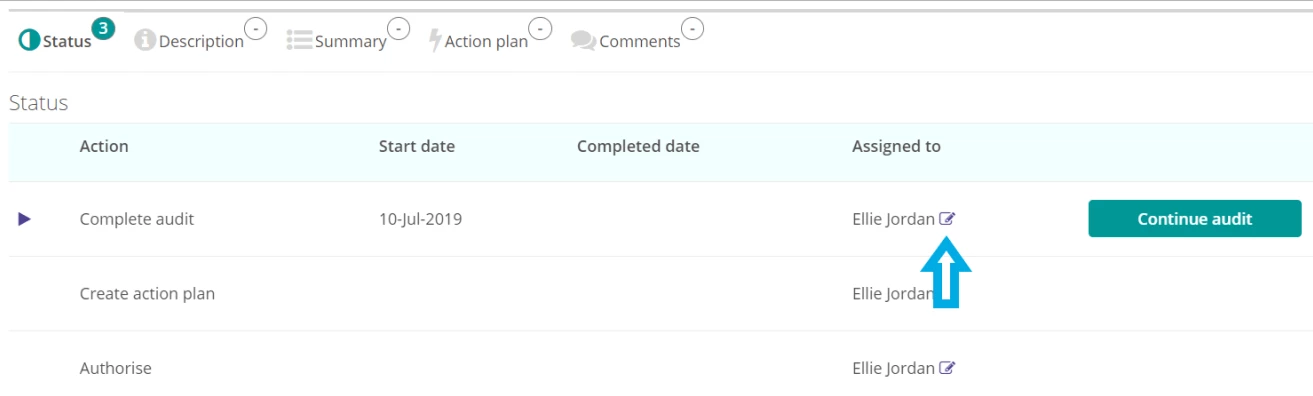
- To do this, from within the audit, scroll to the Status table at the bottom of the screen.
- Here you will see which step the audit is currently up to (i.e. the audit questions, creating an action plan or authorisation), along with the name of the individual who has been assigned the current step.
- To reassign the step, click the pencil icon next to the name of the current auditor or authoriser.
- Select who you would like to reassign the audit to and click Save. Only users with the correct permissions to perform or authorise an audit will appear in the list.
- The audit will now appear on the dashboard of the user it has been reassigned to.
- If you reassign the Audit Questions step of an audit, the person you have reassigned it to will also receive the Action Plan step.
- You can only reassign the Action Plan step once the audit has reached that step.
- If an audit is set to automatically reschedule, the next audit scheduled will be assigned to the same person as the individual who completed the previous audit.